



NEW - - - MACTIPS
 If you cannot see your Recovery Partition on OS X Yosemite . .
it's still there! . . it's just HIDDEN . . by just simply Booting up
with -- COMMAND key + R -- you'll see (above) this moving
Globe . . may take up to an hour.. depending on your machine..
(you need your internet to be connected, for this to work.)
 <--FREE-ManyCam for Intel Macs
[No AppStore needed]
<--FREE-ManyCam for Intel Macs
[No AppStore needed]
Best Browsers for those still using PPC's -->> 

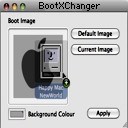
 FINALLY! BootXChanger for:
(PPC)10.4x/10.5x, or (Intel)10.4x/10.5x/10.6x & 10.8.5(tested)
FINALLY! BootXChanger for:
(PPC)10.4x/10.5x, or (Intel)10.4x/10.5x/10.6x & 10.8.5(tested)
 OR,
OR, 
Here are TWO Mac Utilities, I just can't live without...!


==========================================================================
![[1]eMac-G4(PPC)](emac1.gif "[1]eMac-G4(PPC)")
![[2]iMac-G5(PPC)](iMac2.gif "[2]iMac-G5(PPC)")
![[3]Intel/iMac-i3](iMac-i3.png "[3]Intel/iMac-i3")
![[4]the Mac-Mini](Mini-3.gif "[4]the Mac-Mini")
![[5]Intel/MacBook Pro Core 2 Duo](MacBook-Pro3.gif "[5]Intel/MacBook Pro Core 2 Duo")
![[6]the Intel/Mac-Pro Quad-Core Xeon](MacPro3.gif "[6]the Intel/Mac-Pro Quad-Core Xeon")
![[7]the Intel/iPad/iPad-Mini Specs](EYE_pad.gif "[7]the Intel/iPad/iPad-Mini Specs")




~
Best Ram Configurations for the PPC/eMac G4, PPC/iMac G5", Intel/iMac Core i5
the MacBook Pro w/Intel Core 2 Duo, and the Intel/Mac-Pro Quad-Core Xeon" ~
(1) The (PPC)"eMac G4", has performed admirably(1.25ghz) after
installing 'two-512mb(PC-2700)of Ram.. What a difference...!
(2) The (PPC)"iMac G5", has done quite well,(1.8ghz) when 'two-512mb(PC-3200)
Ram were installed... Although, 'two 1GB(PC-3200)would be best configuration.
(3) The Intel "iMac i3", has 4GB standard,(3.2ghz)works quite well, and with 2-
4GB(1333 MHz PC3-10600 DDR3 SDRAM)installed, is unbeatable.(10.6x/10.7x/10.8x)
(4) the Intel/Mac Mini Dual-Core, comes with 2GB(4GB in 2010)of DDR3 PC3-8500
SODIMM installed..Since the "Intel/Mac"(universal) 10.5x/10.6x software works Best.
(5) the Intel/MacBook-Pro Dual-Core, comes with 4GB of DDR3 PC3-8500
SODIMM installed..Since the "Intel/Mac"(universal) 10.6x software works BEST.
(6) the Intel/Mac-Pro Quad-Core Xeon, is best suited with at least
2GB of(DDR2 PC2-5300)Ram installed..the Intel/Mac"OS X 10.5x, or
OS X 10.6x software works best.(running 12GB since 2011-fantastic!)
(7) and Finally, the Intel/iPad/iPad-Mini is great Tool to surf the Web,
listen to Music..Play Games..read & send email..BUT if you want use
it to Transfer files(other than Music/Photos) & use for real Work!..you'll
need a WiFi Hard-Drive Like one Shown Here other than that the NEW
iPad only provides ONE available "Lightning connector"..and what with
iPad's only connector, your at a loss! - it's a Learning tool But for now,
iPad/iPad Mini, is basically just a Really Cool Gadget!(in My opinion)
==========================================================================
Download NEW Drivers for your (PPC/Intel-Mac) Web Cam
 (Sept 25 2009)
I've tested this one, using an older "Logitech Web Cam" on my Older 32bit Intel-"Mac Pro"(works best on Older PPC-Mac)
Once installed - click on "macam" - There you will see the "Image Window"
==========================================================================


If you're Intel-Mac is having problems with the New "Mighty Mouse" v1.3
Try adjusting the "Application Enhancer" in "System Preferences"..
- NOTE1: Some Mac-Intel Improvements-with-OS X 10.4.9(Tiger) update!
- NOTE2: No Mac-Intel Improvements-with-OS X 10.4.11(final Tiger update)...
- Final Note: No problems encountered with Mac-PowerPC models -
Only noticeable Slow-down, is on 'Boot-up'... takes longer to 'RE-start'(w/Intel-Mac).
 - Version 2.0b1, Mighty Mouse makes its return,with full support of Mac OS X 10.5 Leopard.
REQUIREMENTS: PPC / Intel, Mac OS X 10.4-10.5.8.
You'll Need "Application Enhancer" ver. 2.5/2.5.2 to install..if you have
an older "Application Enhancer" already installed, just upgrade!-OR, Click the Graphic
Below-then Goto BOTTOM of page where it says "If you need to install Application Enhancer
on Mac OS X 10.4, get an older version HERE.--->"


==========================================================================
- - My(newest) "Mighty Mouse" Cursor set Downloads - -
It is possible to use the following "Cursors" on Snow-Leopard 10.6x by
adding this to the "info.plist" - "APESnowLeopardCertified"... "true"
then SAVE..(only possible with the "Mighty Mouse 2.0b1" version)
 Download my NEWEST 10.5x Leopard Cursor set (PPC/Intel-Mac 10.4x/10.5x Leopard)
 Download Grey Apple Cursor set (PPC/Intel-Mac 10.4x/10.5x Leopard)
 Download Paintbrush Cursor set (PPC/Intel-Mac 10.4x/10.5x Leopard)
 Download Bigramac Cursor set (PPC/Intel-Mac 10.4x/10.5x Leopard)
 Download Tiger-Mac Cursor set (PPC/Intel-Mac 10.4x/10.5x Leopard)
 Download Right-Hand Mac Cursor set (PPC/Intel-Mac 10.4x/10.5x Leopard)
 Download Lars-Mac Cursor set (PPC/Intel-Mac 10.4x/10.5x Leopard)
 Download Applecore Cursor set (PPC/Intel-Mac 10.4x/10.5x Leopard)
 Download Fat-Pencil Cursor set (PPC/Intel-Mac 10.4x/10.5x Leopard)
For all you Mac 'purist's' - If you're having problems seeing that S m a l l' - DEFAULT CURSOR...
Just open "System Preferences"-click -  "Universal Access" - then click - "Mouse"...
then(bottom of screen)slide bar to 'personlize you're Default Cursor size.
==========================================================================