
 . . . Continued
 Return to Funnstuff Page1

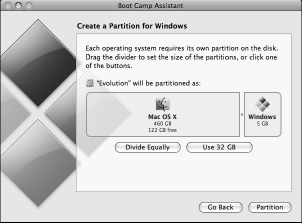
You can Now INSTALL Windows XP(SP2/SP3/Vista/Win7)on your Mac,
you need Intel Mac OS X v10.4.6 - minimum..and, You also need
A Minimum 2GB(4GB-Vista/Win7) of Ram installed.. *********
 *********
OS X 10.6.8 Snow Leopard - is - Last Mac OS, to use This
*********
OS X 10.6.8 Snow Leopard - is - Last Mac OS, to use Thisversion of Boot Camp!..use Boot Camp v4 w/Win7 & Lion!
============================================
 Important NOTE for ALL Mac Owners:
Example: If the Mac you own today was purchased w/10.4x Tiger installed..
You can install a Newer OS(w/needed Ram), But if it came w/Snow Leopard..
Then You will NOT be able to INSTALL 10.4x Tiger on it, OR 10.5x Leopard..
The reason I was given was, THAT Mac you purchased was Shipped with..
an OS that was NEW at the time you Purchased it, You Can't Install an Older
OS... EVEN if you were to ERASE the ENTIRE Drive, Both the Architecture
AND The Hardware installed in THAT Machine was only Designed to use
what came with THAT machine, OR NEWER!(and here I thought Apple cares)
NEW - - MACTIPS


Easy transition from 10.8x to 10.10, but NOT from 10.9x..




 the OS X 10.5x Leopard(last version for use w/PPC)
Mac OS X 10.6x Snow Leopard is still available...
and If you've got the Intel(10.4x)version, you can
upgrade it for $29.00! So I think I'll Wait until
I buy my Next Intel-Mac Machine..(NO-WAY!)
it's now "Mountain Lion" v10.8x.... But wait,
Scratch that..now it's OS X 10.9(no more cats)
No thanks, I'll keep Snow Leopard(10.6x)..!
Mac OS X 10.3x/10.4x Firewall-Note: The Mac OS X 'Firewall', is turned off by default! - You need to open..
"System Preferences" - 'click' on "Sharing"..then 'click "Firewall"..Then.."Start"
 The Mac OS X 10.5x/10.6x 'Firewall'(simpler), is also turned off by default! - You need to open..
"System Preferences" - 'click' on "Security"..then 'click "Firewall"..Then.."Start"

![MUST Have utility[this may NOT be available]](Pre-change2.png "MUST Have utility[this may NOT be available]")
 Screen Capture(command/shift/4), can be saved as your favorite format..
using this Free OSX 10.4x/10.5x/10.6x program, allows you to always save as
PDF/TIFF/JPG/PNG/BMP/GIF..OR Open the 'Terminal.. Then from terminal type the following:
defaults write com.apple.screencapture type pdf(or, JPG/TIFF/PNG/BMP/GIF)
{!! This App may NOT be available !!}..USE command + shift + 4,
Or on macOS-Mojave..USE Command + shift + 5!!
** Mac Application Un-install: **


a MUST-Have utility - for - OS x 10.4x/10.5x/10.6x
Important NOTE: Set as shown in Graphic !
*** Mac Music and Video Converters: ***

** Mac AVI/WMA/WMV Converter: **

 ============================================
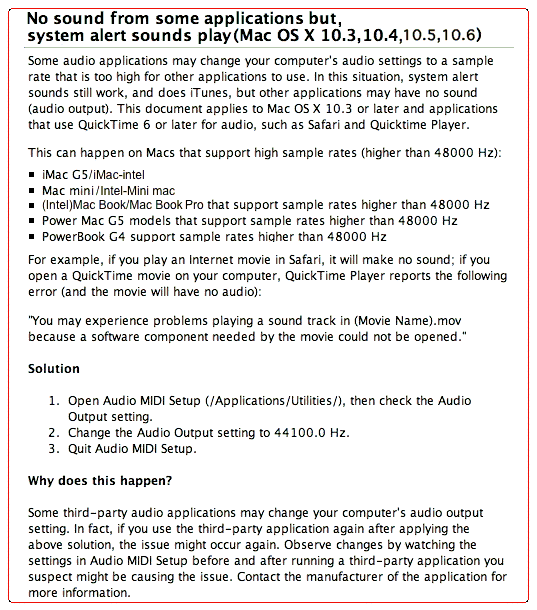
How to FIX "NO Audio Output", in Mac
Read Below . . .
Or, get more help here . .
No sound from some applications
============================================
effect your iMovie/iMovie HD
 application
example: No Video displayed on screen,
when you try to PLAY-BACK - Camcorder
=======================================================================
MAC Maintenance Tips
(1) Repair permissions with Disk Utility(like FREE OnyX) once a month
Before you sell or give away a Mac, make sure that no personal data remains on it,
(2) Backup home directory - burning it to a CD-RW/DVD-RW at least once a month
(3) Run Software Update manually at least once a month
=======================================================================
Securely erase your hard disk
After you've copied all your files to your new Mac, restart the old one from the Mac
OS X installation disc. Open Disk Utility
and select your disk from the list on the left.
Click on the Erase tab and then on Security Options. Next, choose one of the
several erasure methods that are offered. The 7-Pass Erase option is probably
sufficient for most people, but if you're truly paranoid, select 35-Pass Erase, which
will make it nearly impossible for anyone, even James Bond, to recover your files. If
you're using a laptop, make sure it's plugged in. This process can take a long time.
Tiger only hint, Here's how to take a screenshot from a DVD
in Mac OS X Tiger. I noticed another hint said to quit DVD Player
and all that other stuff ... but that's too much work.
Here's a much simpler workaround:
1. Go to the part of the movie you'd like to capture. Hit the Stop button in the DVD controller.
2. Press the Play button in the controller, and then immediately press down Command-Shift-4.
3. Hit the space bar to take a screenshot of the DVD Player window, then click the mouse to take the shot.
You can do all this without ever quitting DVD Player first.
=======================================================================
 The "CandyBar" Icons Application(ABOVE) is simple enough to use..
But, there is another way to CHANGE - Some System Icons(PNG)
Like - the Trash/Apple(URL)/Finder Icons.. Read below..
 NOTE: With some Mac versions, the only way to be sure...
is to use "OnyX", then click - "Cleaning" - check -
"System cache" - then "Restart"..
=======================================================================
Return to MAC-TIPs Page2 
